
Now taking early inquiries. Services are planned to begin in 2027; aerial work starts once pilot certification, insurance and equipment are in place. Tell us what you’d like to see
Marine electronics

A helm that works as one system.

Navigation, sonar, radar, cameras, internet and wiring planned together as one network, so the boat has clear controls and clean installs instead of a pile of separate boxes.

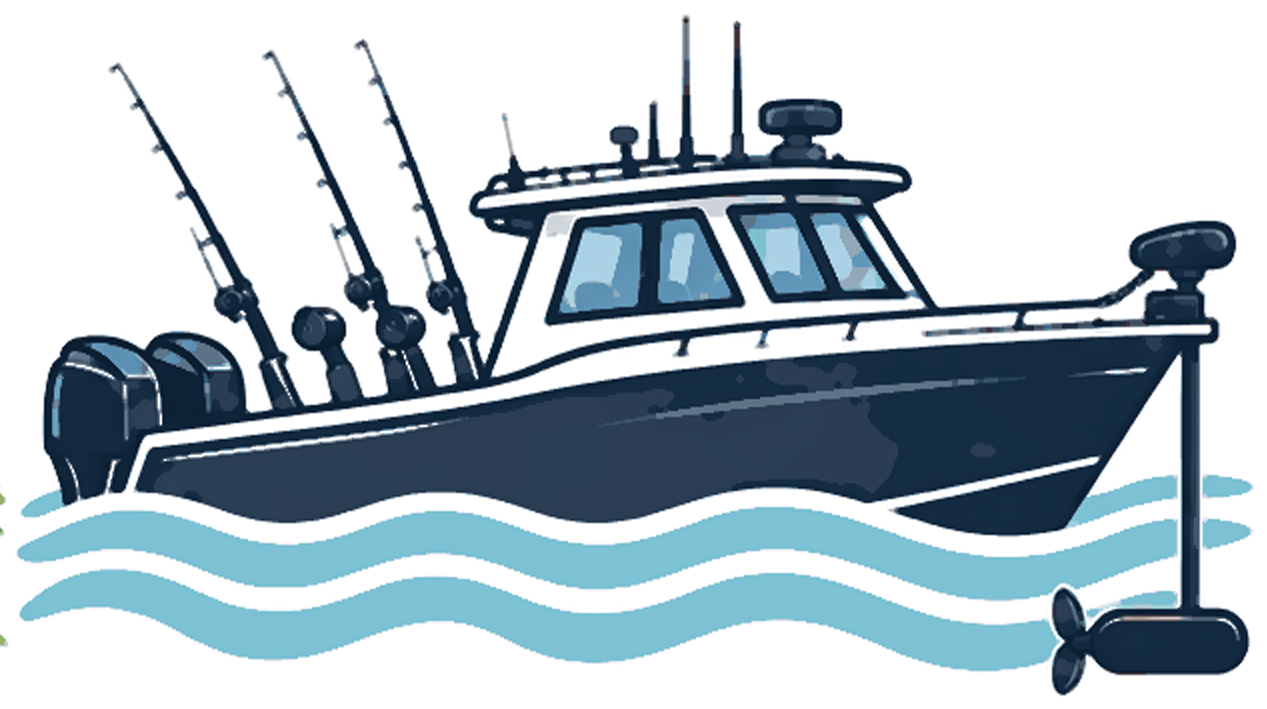
Illustration of a fishing boat with rods and a trolling motor on the waterMarine Electronics services ↓
Status: Marine electronics sales and installation are a planned offering. Compatibility, features and availability depend on the specific model, software and manufacturer documentation.
Common starting points

Which of these sounds like you?

Refitting an older helm

Aging displays, no space, and no network paths. We plan a phased upgrade that you can afford in stages.

Building or buying new

Electronics are easier to integrate before panels and cable runs are final. Plan them with the build.

Something doesn’t work right

Intermittent faults usually come from power, cabling or settings. We isolate the cause before recommending parts.

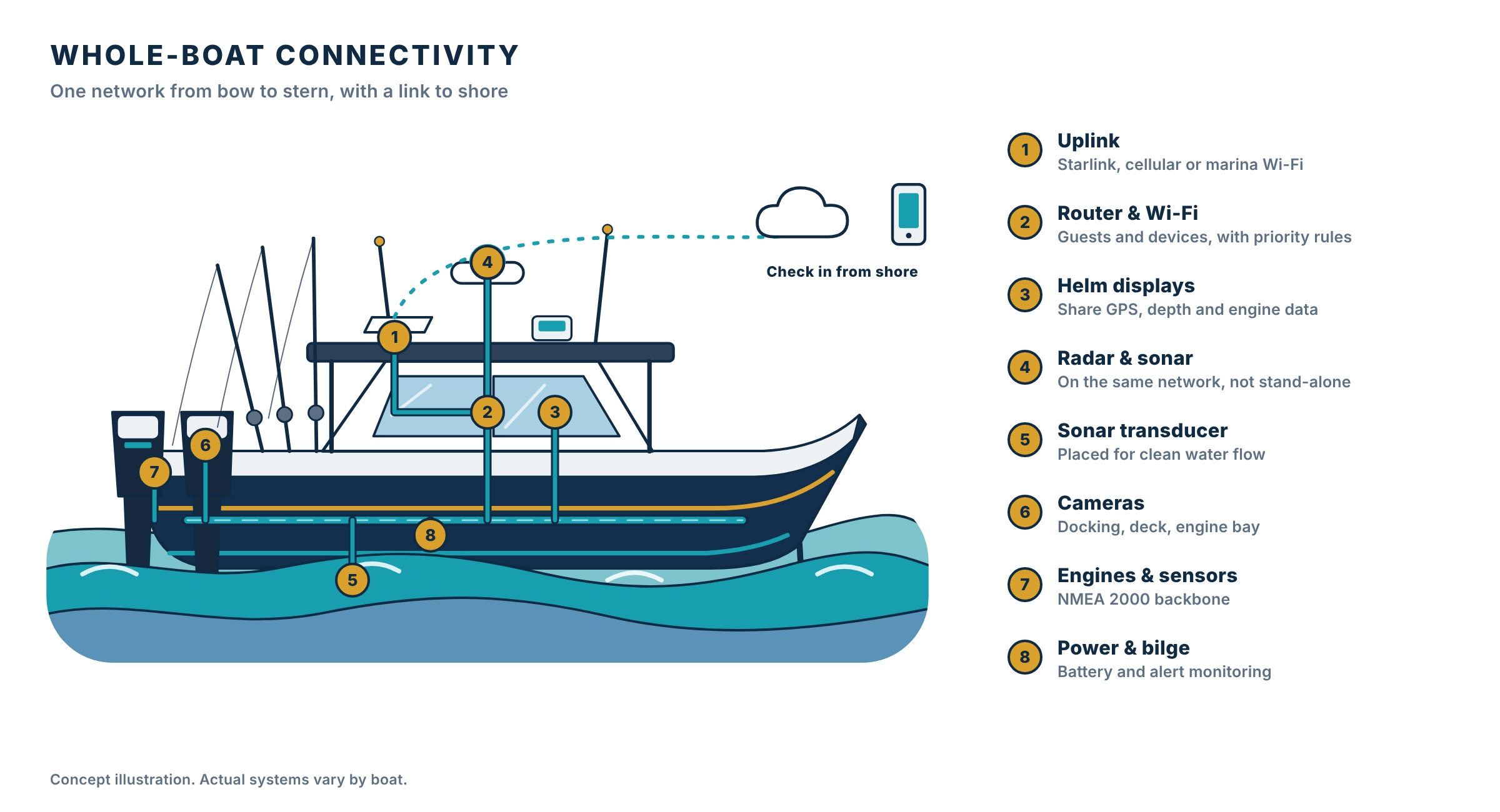
Diagram of a boat with uplink, router, displays, radar, sonar, cameras, engine data and power monitoring on one networkConcept image. A photo of our own work will replace it.
Whole-boat connectivity

Your whole boat on one network.

Displays, radar, sonar, cameras, engine data and an internet connection can all share one backbone, and you can check on the boat from shore. We plan it as a system, then install and label it.

  • Starlink, cellular or marina Wi-Fi with automatic failover
  • Helm displays that share GPS, depth and engine data
  • Cameras and alerts for the dock, deck and engine bay
  • Battery and bilge monitoring you can read on your phone
01

Helm refits & new-build planning

The problem

Older helms lack space, power and network paths for modern equipment, and new builds suffer when electronics are an afterthought.

How it helps you

Your boat’s screens and controls laid out so they’re easy to read and use, installed neatly.
  • Owners replacing aging electronics
  • Custom boats
  • New fit-outs
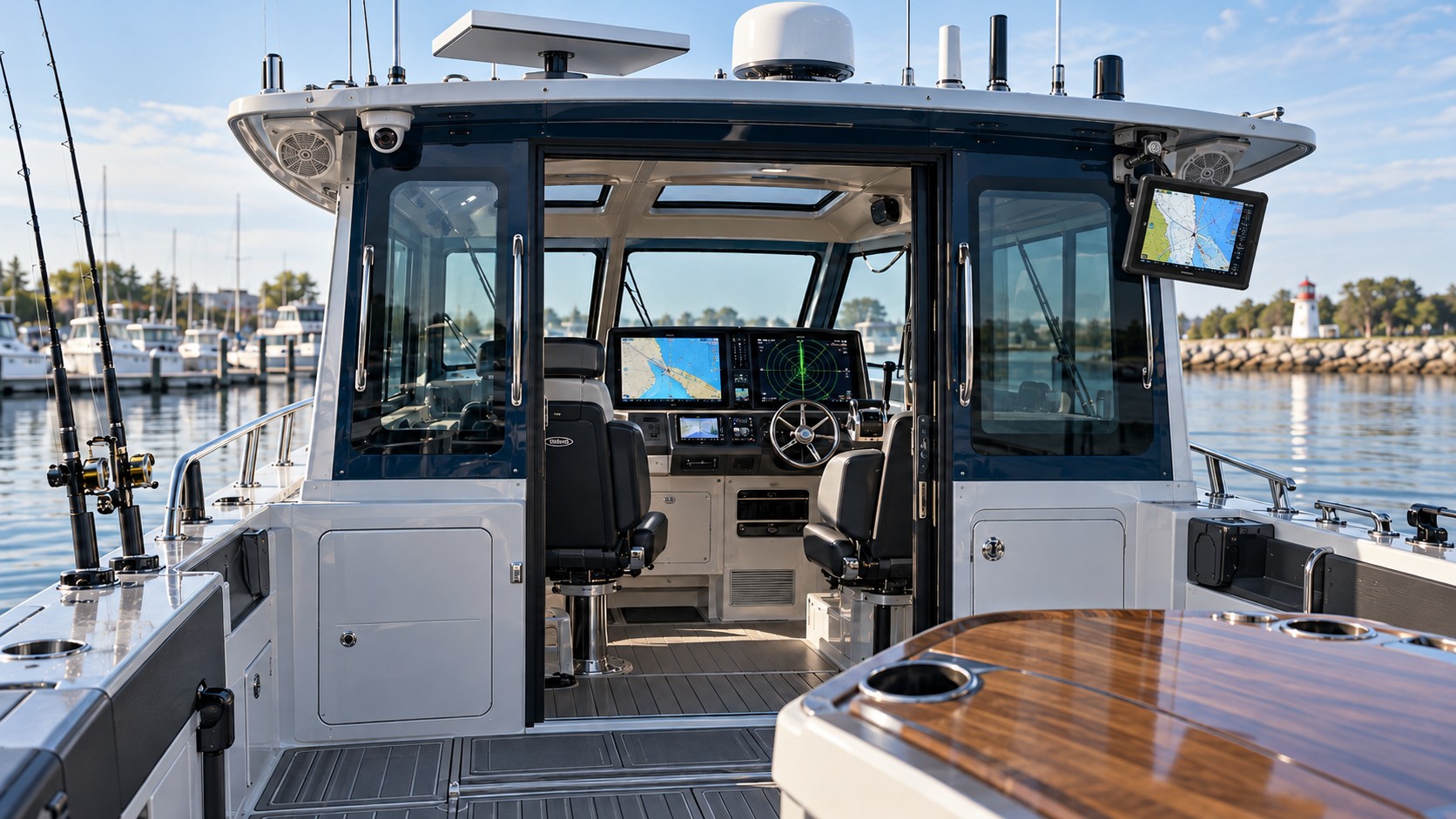
Modern fishing boat helm with radar, satellite dish, camera and two chartplotters connected as one systemConcept image. A photo of our own work will replace it.

How we solve it

  1. Assess what you havePanel layout, displays, cabling, switches, transducers and legacy equipment.
  2. Design the layoutDisplay positions, mounting and sightlines, with serviceability in mind. On new builds this happens before panels and cable runs are final.
  3. Phase the workA plan that spreads cost and keeps the boat usable between steps.
  4. Install and documentClean installation and a record of every connection.

What you receive

  • Helm layout plan
  • Documented device connections
  • Phased installation plan

Equipment selection draws on Garmin, Humminbird, Minn Kota, Cannon, Raymarine, Simrad, Lowrance, Furuno and others, based on compatibility, support and how you actually use the boat. We don’t manufacture or own these brands.

02

Chartplotters & displays

The problem

Multiple displays and sources should show consistent, useful information, and shouldn’t force you to reach across the helm.

How it helps you

Your navigation screens all show the same, correct information.

  • New helm builds
  • Refits

How we solve it

  1. Place the displaysLocations based on sightlines, glare and reach.
  2. Plan the data connectionsNMEA 2000, Ethernet and manufacturer networks to share GPS, depth, engine and sonar data.
  3. Configure and testSources, sharing and settings checked at the dock.

What you receive

  • Integrated display layout
  • Documented source connections
03

Sonar & fishing electronics

The problem

Sonar performance depends on transducer choice, placement and system integration, and mistakes are hard to fix after the hull is wet.

How it helps you

Fish-finding gear chosen and installed to match how you fish.

  • Fishing boats
  • Recreational boats upgrading fish-finding

How we solve it

  1. Understand how you fishDepth, speed, target species and how the boat is used.
  2. Choose and place the transducerMounting method suited to the hull, with a plan for clean water flow and cable routing.
  3. Integrate with the restChartplotter, trolling motor and accessories coordinated into one package.
  4. Set up and testSettings documented and checked on the water where possible.

What you receive

  • Configured sonar system
  • Documented transducer and display settings
04

Radar integration

The problem

Radar needs careful placement, clearances, power and a compatible display.

How it helps you

Radar installed in the right spot so you can see what’s around you in bad weather.

  • Navigation-focused vessels
  • Offshore-capable boats

How we solve it

  1. Pick the scanner locationHeight, clearances and sightlines per the manufacturer’s guidance.
  2. Route cable and powerNetwork or power cable routed and protected.
  3. Connect and commissionDisplay integration verified.

What you receive

  • Connected radar system
  • Verified display integration
05

VHF & AIS communications

The problem

Reliable communication depends on antennas, cable, power and configuration.

How it helps you

A radio that reaches the Coast Guard and other boats, and shows nearby ships on your screen.

  • Recreational and commercial vessels

How we solve it

  1. Choose the antenna locationPlacement for range and separation from other antennas.
  2. Install and connectRadio, antenna cable and AIS data sent to your displays.
  3. Test and orientInterfaces verified and the operator shown how to use them.

What you receive

  • Communications installation with tested interfaces
  • Operator orientation
06

Autopilot integration

The problem

Autopilot systems depend on compatible steering and well-calibrated sensors.

How it helps you

Let the boat hold a course so you can focus on fishing or watching the water.

  • Owners adding automated steering to compatible vessels

How we solve it

  1. Evaluate the steeringSteering type, control interfaces, heading sensor location and installation constraints.
  2. Install the componentsHeading sensor, drive and control.
  3. Calibrate and sea-trialDockside setup, then on-water testing.

What you receive

  • Documented autopilot integration
  • Commissioning plan and results
07

Whole-boat connectivity

The problem

Most boats have a pile of separate boxes: displays that don’t share data, a phone hotspot for internet, cameras on their own recorder, and no way to see the boat from home. They work better, and are easier to fix, when they share one network.

How it helps you

Your boat’s electronics, internet and cameras work as one system you can check from home.

  • Fishing and cruising boats
  • Boats stored at a dock or marina
  • Multi-display helms

How we solve it

  1. Map every deviceDisplays, radar, sonar, engines, cameras, sensors and the internet source, and what each needs: Ethernet, NMEA 2000 or both.
  2. Choose the uplinkStarlink, cellular, marina Wi-Fi or a mix, with automatic failover and rules for what gets priority. We explain realistic speeds and costs.
  3. Build one backboneA marine-grade router and switch, protected power, and a clean Ethernet and NMEA 2000 layout so devices share data.
  4. Add eyes and alertsCameras for docking, deck and engine bay, plus battery, bilge and position alerts to your phone, as your boat supports.
  5. Label, test and hand offA labeled diagram that matches what is installed, tested at the dock and, where possible, on the water.

What you receive

  • Labeled network diagram
  • Uplink with failover and stated limits
  • Shared displays, radar and sonar
  • Camera and alert setup
  • Operator walkthrough

Worth knowing: satellite and cellular performance depend on location, coverage and weather, and NMEA 2000 support doesn’t guarantee cross-brand access to proprietary sonar, trolling-motor or downrigger features. We check compatibility and tell you what to expect before quoting.

08

Marine cameras

The problem

Boat cameras must survive the environment and give useful views.

How it helps you

See the dock, deck or engine room from the helm or your phone.

  • Vessels adding monitoring
  • Maneuvering assistance

How we solve it

  1. Choose the viewsDocking, engine room, deck or security.
  2. Place and routeMarine-grade cable, sealed penetrations, power.
  3. IntegrateDisplay or recorder integration and checks day and night.

What you receive

  • Configured camera system
09

Electrical integration

The problem

Electronics reliability depends on proper power distribution and corrosion-conscious installation.

How it helps you

Safe, clean wiring so your electronics stay reliable and don’t drain batteries.

  • Helm refits
  • Multi-device upgrades

How we solve it

  1. Plan the circuitsDedicated, protected circuits sized for the load.
  2. Protect and groundOvercurrent protection and grounding/bonding to applicable marine standards.
  3. Route and terminateMoisture-resistant terminations and tidy cable routing.
  4. DocumentA breaker map and wiring record.

What you receive

  • Documented power and wiring approach
  • Breaker map
10

Vessel remote monitoring

The problem

Owners want visibility into the boat when they aren’t aboard.

How it helps you

Get an alert on your phone if something is wrong with the boat while you’re away.

  • Stored vessels
  • Boats with ongoing systems

How we solve it

  1. Choose what to monitorBilge, battery, position or temperature, as your boat supports.
  2. Provide the connectionPower and connectivity for the monitor.
  3. Set alertsAlerts that mean something and a clear picture of limits.

What you receive

  • Monitoring design
  • Defined alerts
  • Stated connectivity limits
11

Marine electronics troubleshooting

The problem

Intermittent faults can come from power, cabling, terminations or software settings.

How it helps you

We find the real cause of the problem before replacing anything.

  • Vessels with unreliable electronics

How we solve it

  1. Reproduce and isolateSystematic checks of power, network, sensors and displays.
  2. Test the causeMeasure instead of guess.
  3. Recommend repairsPrioritized, with the evidence.

What you receive

  • Fault report with tested findings
  • Prioritized repair recommendations
Example build

Great Lakes trolling & navigation

A multi-display helm, sonar, radar, VHF/AIS, autopilot, GPS trolling motor and electric downriggers planned as one understandable system. Exact integrations vary by manufacturer and model.

Bow

GPS-enabled trolling motor, a dedicated display and a suitable transducer.

Helm

Primary navigation and sonar displays, VHF, engine data where supported, and protected, fused power distribution.

Stern

Electric downriggers with safe cable routing, appropriate breakers and network connections where supported.

Delivered with an equipment and compatibility matrix, network and wiring diagrams, breaker map, software settings, dockside checks and an on-water walkthrough.

Questions

Straight answers.

Can you integrate electronics from different brands?

Sometimes, depending on supported NMEA, Ethernet and manufacturer-specific interfaces. We confirm compatibility before specifying equipment.

Do I need to replace my existing displays?

Not always. We assess installed equipment, available connections and firmware before recommending replacement.

Does installation include testing?

Yes. The scope can include power and network verification, sensor configuration, dockside checks and sea trials.

Can you install at my marina or dock?

That’s the plan. Installation can be done where the boat is kept, within our service area, so you don’t have to bring it to a shop.

Can you add internet to my boat?

Cellular, Wi-Fi and satellite options are possible. Performance depends on service availability and antenna installation.

Tell us what you’re trying to get done.

A short description is enough. We’ll reply with questions or a recommended next step, not a generic package.

Request a quote

or email [email protected] or call (989) 640-5963